CAD projects. Assemblies, mechanisms, CAE simulations...
If you are a technician (engineer, etc), you might find this interesting
These are some academic projects that are not very different from some real life projects I took on in an engineering job I had.
All this was done in SolidWorks, but can be replicated in any other commercial CAD package.
So here are the projects
Tilting trike with tilting and steering mechanisms
In this project, I fixed some messes my classmates did with assembly mates.
Given I fixed the planes and mating issue, I also modeled the mechanisms, and generated some engineering drawings.
They didn’t respect symmetry planes when modelling, and, when it counted, a teacher pointed out the model was slightly tilted to a side in one of the views.


Another trike. FEM simulations.
This trike is a concept design. It was made to host a person inside.
for this one, I chose the materials and ran some FEM simulations to study if aluminum was enough to withstand pedaling efforts. FEM simulations were done with AbaqusCAE.
I had to choose a brake system, electric motor and materials. both for bodywork and chassis.
The first image is a stress calculation (Von Misses).
The second one has a deformation calculation in the longitudinal axis.


The thesis dissertation. CFD for a turbocharger.
In this project, I calculated the torque generated in a turbocharger turbine.
The bigger the incoming airflow, the higher the torque.
Data was inspired in automotive low-performance turbochargers.
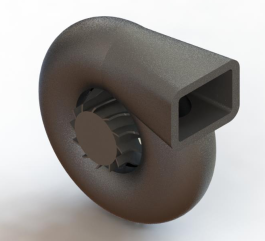
I made renders for aesthetic reasons, for which I assigned materials to its pieces in SolidWorks.
I learned to:
- use turbulence models,
- delved deeper in meshing using static and moving meshes (rotating meshes to simulate motion),
- learned about stationary and transient simulations,
- and analyzed results, besides creating animations.
- Ah, and I learned to process geometry for calculations, both in SolidWorks (using different formats) and ANSYS.
Working fluid is air, as it has similar proprieties as exhaust gases.
Tools:
- SolidWorks,
- ANSYS
- DesignModeler to process geometry,
- ANSYS Meshing to make meshes,
- ANSYS Fluent to set up the model and perform calculations,
- CFD-Post to see results and make animations.


El ventilador de techo. The ceiling fan. SolidWorks Motion
In this project, I calculated the torque needed to move at a certain velocity the blades of a ceiling fan.
I had a fan at home, and measured all the relevant pieces.
I designed them in SolidWorks.
I assigned materials to them, in order to calculate the torque.
I also used configurations to manipulate the assembly or pieces in the most convenient way. Same with equations.
To calculate the torque, I also had to account for rotational drag. So I modeled an equation in SolidWorks Motion.
As this was a big SolidWorks project in the CAD subject, I also did the following:
- drawing with BOM (Bill Of Materials),
- assembly drawings,
- piece drawings,
- manufacturing process assignation for non-commercial pieces (using commercial elements for screws, nuts…).
Here you have some screenshots of this project.


Well, if you made it here, I have something better for you
If you’re reading tis page, I probably wanted you to see my CAD portfolio.
But, I have a newsletter. I talk about different topics in it. Job seeking advice for juniors, engineering stuff (or other things I might be currently learning), entrepreneurship with a focus on marketing…
It’s more interesting than this portfolio. In it, I try to make you be a better person everyday, telling you stories and tips that I find useful.
You can subscribe in the box below.
Joining is free, unsubscribing too.
It’s in Spanish. If you want to challenge your Spanish and the topics resonate with you, there it is.
If that’s too much of a barrier, it’s ok.
I tell more interesting stuff in my newsletter.
If you subscribe, it means you accept the Privacy Policy.
DO NOT use corporate emails, as you won't probably receive my emails.
Thanks!
You joined the newsletter. Check your inbox and spam folder.